How I use AI in my own work
I use AI to help maintain this website and prepare my daily work. Here is one website change you can inspect, followed by how the other routines work.
From my own website
Making a focused form option visible.
A browser check found that keyboard focus could land on a checkbox hidden underneath the fixed booking bar. Here is the observation, the prepared change and the check of that change.
Checked: · Page: /workflow-check · Viewport: 390 × 844
Both screenshots were captured in local previews of the earlier eight-question form, comparing the baseline with a prepared change. The form was later shortened to six questions. The ten-Tab measurement applies only to that captured layout. It does not describe the keyboard path in the current form.
Try the current form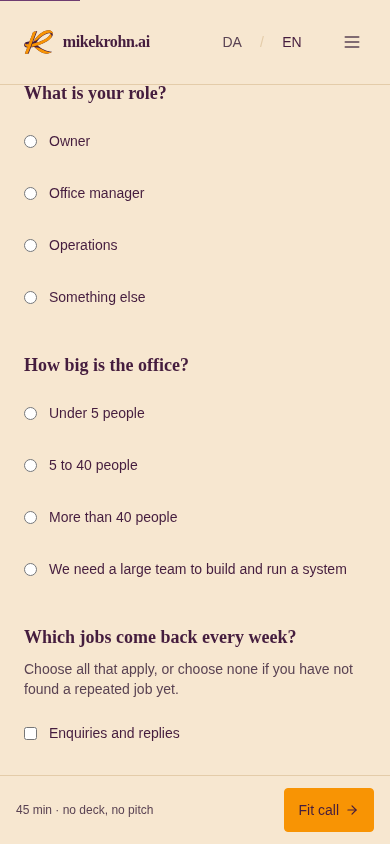
The Website updates checkbox is hidden behind the booking bar at the bottom of the screenshot.
Open the full screenshot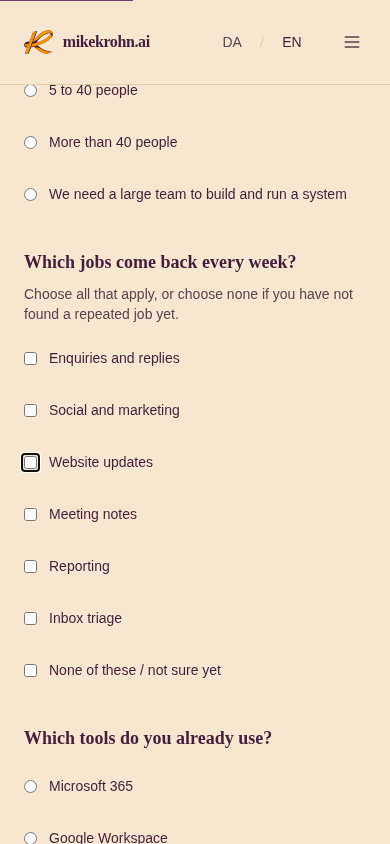
The focused checkbox is visible in the captured layout. The fixed booking bar is absent.
Open the full screenshotObserve the problem
The check followed keyboard focus through the earlier eight-question form as the page scrolled.
Prepare a bounded change
Remove the fixed booking bar from the first-look form. Keep the booking link in the navigation.
Check the changed page
The same keyboard path was repeated in that layout at the same viewport. The focused option was visible and the fixed bar was absent.
Review before publication
The browser check is evidence for review. Mike still reviews the change and decides what is published.
Check method and measurements
A local preview of the earlier eight-question English form was loaded in Chromium, and Tab was pressed ten times without submitting the form. The Website updates checkbox and fixed booking bar were measured in viewport pixels. This path applies to those captures only.
Chromium 151.0.7922.34 · prefers-reduced-motion: reduce
| Measurement (CSS pixels) | Before the change | With the change |
|---|---|---|
| Top of focused checkbox | 830.5 | 455.5 |
| Bottom of focused checkbox | 843.5 | 468.5 |
| Top of fixed booking bar | 775 | Removed from this form |
| Checkbox covered by the bar | 13 | 0 |
Scope: one historical keyboard path on my own website, in the earlier eight-question layout at the viewport shown. This check does not measure time saved or establish accessibility across every page, device or browser.
How the routines work
This website
A coding agent helps me build this site in the repository. Changes go through type checks, lint, tests and a build. I review and merge the changes before they go live.
- The agent prepares
- Changes to the website in the repository, with checks on the code and build.
- I check
- The changes themselves. I decide what to merge and put live.
The daily brief
A chief-of-staff agent reads my mail, calendar and meeting transcripts and hands me a short brief. It drafts. I send. Nothing is sent by an agent.
- The agent prepares
- A short brief from my mail, calendar and meeting transcripts, plus drafts for me to review.
- I check
- What needs my attention and what to send. I send the messages myself.
The company knowledge behind the work
I keep company notes and reusable instructions in a shared knowledge base I built. The files are Markdown in Git, indexed with the open-source tool gbrain. The agents read this material before preparing work.
Which job keeps coming back in your office?
The useful part is the routine: clear sources, a prepared result and someone responsible for checking it. Bring one recurring job to a free fit call, and we can discuss whether something similar would help your office.